Join a presentation
Watch a shared model and use controls when the teacher grants them.
Join
- Open the session link supplied by the teacher, or enter its code in Presentation.
- Wait for the connection and model to load.
- Follow the demonstration. If you changed your own view, use the available follow-presenter control.
When you receive control
The teacher can grant pose control or URDF editing. These are different permissions: rotating the model does not grant permission to change its description. Use the granted mode; resume watching when control is revoked.
If the connection drops
Reopen the same link and check session status. If the teacher ended the session, a new one is needed. A presentation code is not a WebRTC code for controlling a physical arm.
Controls
| Button or field | Action and result |
|---|---|
| Session code; Watch | Enter the teacher’s code and click Watch. Wait for the Live status and model to load; if the session is invalid or ended, check the link with the teacher. |
| Your name | An optional name helps the teacher identify your viewer number and give control to the correct person. |
| Follow teacher / Look around | Following uses the presenter’s viewpoint. Look around lets you inspect the model independently; it does not grant permission to change the shared pose. |
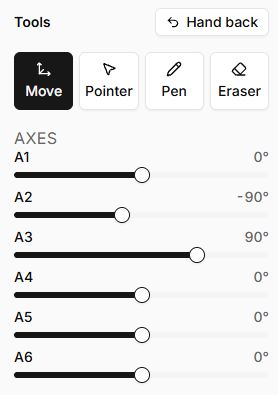
| Move / Pointer / Pen / Eraser | Appear after the pen is handed to you. Choose camera orbit, pointing, drawing or erasing. The class sees your actions. |
| Colour; Width; Axes | With delegated control, set drawing parameters and model joint positions. Change axes in small steps while explaining your observation. |
| Hand back | Gives control back to the teacher. It does not end the presentation. |
| URDF on the board: Read-only / You may edit this | The label shows your permission for the model description. Editing requires File control; Pen alone is insufficient. |
| Follow cursor / Read freely | Lets you follow the presenter’s line or browse the description independently. |
| Download; Show joints | In the available editor, save a copy of the description and show joint markers. Resource loading and session management remain with the teacher. |
| Reconnecting… / Connection lost | Check the network. If disconnected, reload the same session page; this cannot resume a presentation that has ended. |