Set motor IDs
Assign each motor the address expected by the selected model.
Preparation
Use your kit’s wiring diagram. Disconnect power before rearranging cables. During assignment, connect only the motor identified by the current step. Multiple motors with the same ID prevent unambiguous device identification.
Procedure
- Open Set motor IDs and connect the hardware bus.
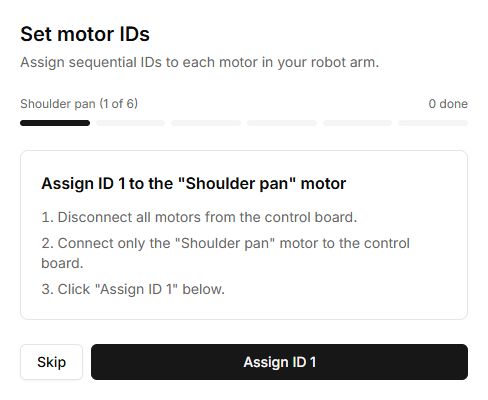
- Read the joint name and required ID on the current step.
- Leave only that motor connected and supply power as instructed for your kit.
- Select Assign ID and wait for verification.
- Label the motor and repeat for the next joint. Skip bypasses a step; it does not confirm configuration of that motor.
- Finish the wizard and verify that all motors are detected with unique IDs.
ID was not applied
Check the single connected motor, power, cables and selected bus. Do not repeat assignment on the whole chain. A success message must refer to the intended motor.
Buttons, fields and results
| Control | How to use it and what happens |
|---|---|
| Connect hardware | Opens the controller connection dialog. Once connected, the wizard shows the current joint and the ID to assign. |
| Assign ID 1 … Assign ID 6 | Writes the displayed ID to the single connected motor. Buttons are unavailable while writing. Success advances to the next number; if an error occurs, stay on the current step and check the connection. |
| Skip | Moves to the next number without writing. The skipped motor is not configured; reaching the final screen does not prove that all six IDs were written. |
| Back | Returns to the previous step. It does not undo an ID already written. Before writing again, connect the motor indicated on screen. |
| Disconnect & finish | Shows the final screen. Despite its name, the current implementation does not disconnect the hardware. Disconnect separately through the connection menu; turn off power according to the kit instructions. |
| Start over | Resets the step number to 1 and reopens the wizard. It does not restore previous motor IDs. |
After setup, turn off power before assembling the shared chain. Reconnect it and check that six different IDs are detected. Neither Skip nor Back checks the complete chain.