Feetech bus
Inspect servo registers before making deliberate configuration changes.
Start with reading
- Connect a supported bus and open Feetech bus.
- Select Scan bus, then the intended Servo ID.
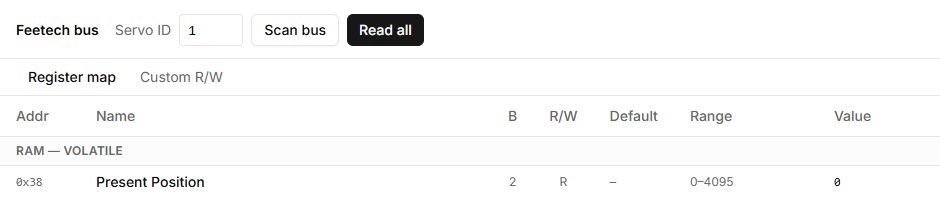
- Select Read all and search for a register by name.
- Compare Value, byte size B, R/W permissions and the description. R means read-only; RW permits reading and writing.
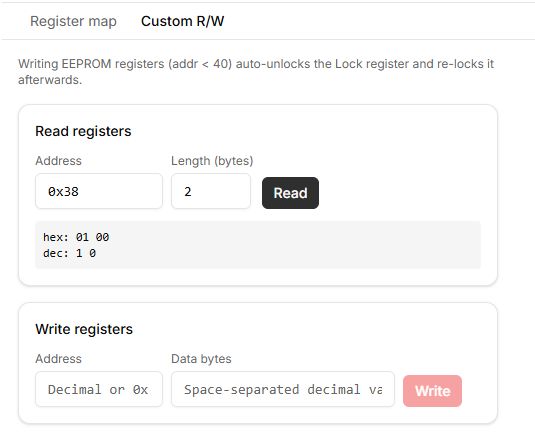
- In Custom R/W, specify an address and length to read. Addresses accept decimal and 0x… notation.
Write registers
First record the original value and check the register against documentation for the exact servo. Select an editable table value, or enter an address and data bytes in Custom R/W, write, then read back. EEPROM writes are automatically wrapped in unlock/lock operations.
Changing IDs, communication speed, limits or torque can affect connectivity and motion. Do not copy screenshot values or disable protections to suppress an error.
Reading failed
Check the ID, power, selected connection and whether another application owns the port. Do not change arbitrary registers to recover connectivity.
Buttons, fields and results
| Control | How to use it and what happens |
|---|---|
| Connect robot | Opens the connection dialog. Register reads and writes require a connection. |
| Servo ID | Enter the target motor address from 1 to 253. After changing the ID, click Read all: changing the number alone does not refresh the table, which may still contain values from the previous motor. |
| Scan bus | Checks addresses 1–20 for replies and selects the first detected ID. It does not scan all 253 addresses. For a motor outside this range, enter its ID manually and read the registers. |
| Read all | Reads the selected motor’s register map again. The button is unavailable during reading. Values do not refresh continuously; read again after the state changes. |
| Search register… | Filters rows by register name or description. Clear the field to show the complete map. |
| Register map | Opens the table: Addr is the address, B the byte count, R/W the access mode, Default the default value, Range the permitted range, and Value the last value read. Default is not the current value. |
| Value in an RW row | Click a value that has been read to edit it. Enter a decimal number within the permitted range and press Write or Enter. Cancel or Escape closes the editor without writing. R rows are read-only. |
| Custom R/W → Read registers | Enter Address as a decimal number or with a 0x prefix, specify Length (bytes), and click Read. For example, address 56 with a length of 2 bytes reads the current-position register. Results appear separately in hex and dec. |
| Custom R/W → Write registers | Enter the address and Data bytes as decimal bytes from 0 to 255 separated by spaces. Write sends them to the motor immediately. Writing may change configuration or movement; check the register’s purpose and record original values first. |
| EEPROM / RAM | EEPROM holds persistent settings; RAM holds working values. Before writing EEPROM, the tool automatically clears Lock and restores it after a successful write. If writing fails, read the registers again and check the final state. |
| Register written / Write failed / Read failed | These messages report the operation result. After writing, use Read all or a separate Read to verify the actual value. |