Modes, sessions and stopping
This reference is for control-software developers. The shared controller handles session setup for replay, teleoperation and tuning; do not run a second manual setup sequence alongside it.
Reset selects Legacy mode. Extension configuration resides in RAM and is not automatically restored from EEPROM. Before a new start, software must check capabilities and support protocol 9.0.
Legacy mode
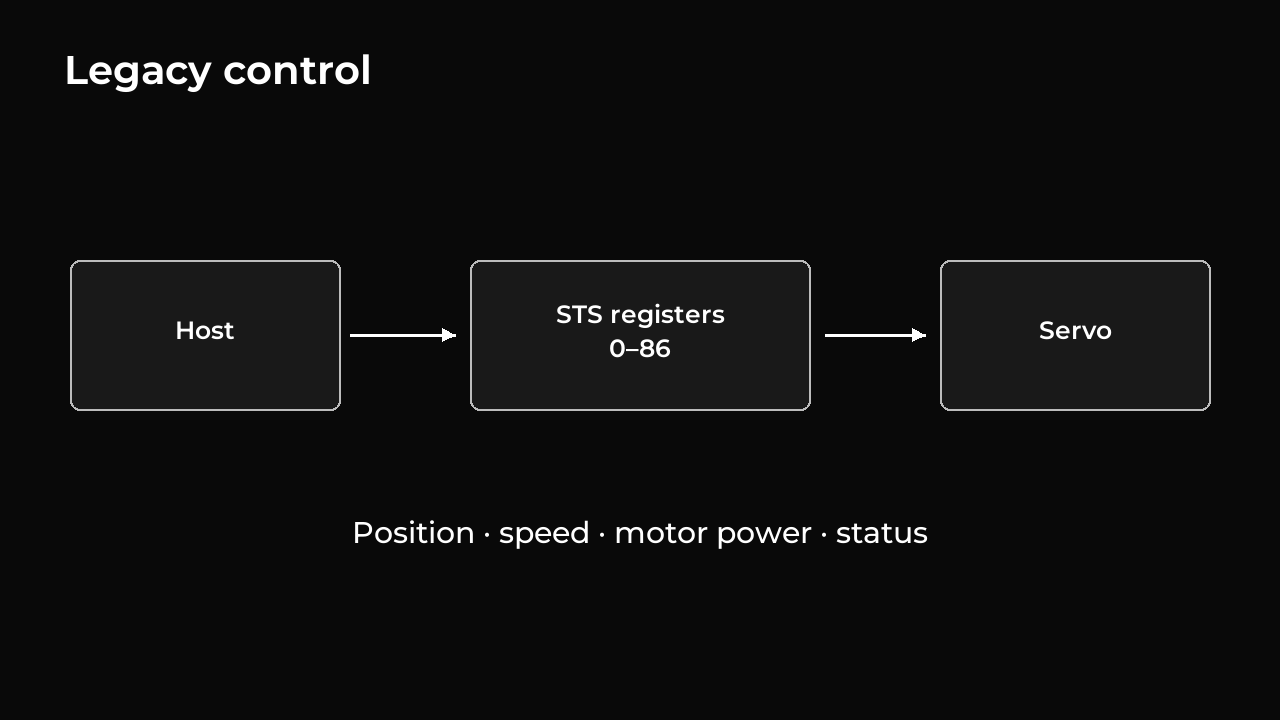
Legacy mode supports the standard STS register interface, including motor power, operating mode, position and speed commands, and status readings. Existing STS software can use registers 0–86 without enabling the extension.
In legacy position modes, enabling motor power without a new position command holds the measured position, even outside the saved limits. It does not replay an old target or move the shaft to the nearest limit. New position commands are still capped to the saved limits.
The extension uses its own motion and control settings. Gain values should not be copied directly between the two modes because their scales differ. Support for the standard commands does not guarantee identical physical behavior across all servo models.
Starting and stopping extension mode
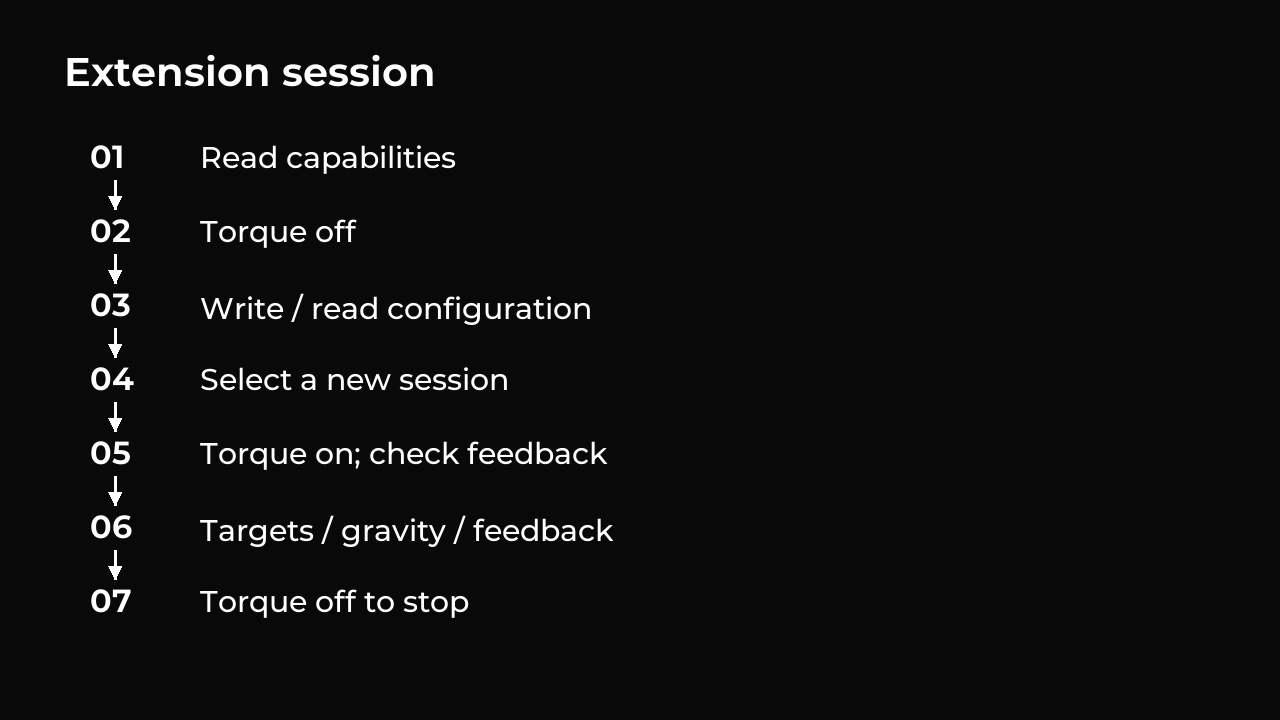
The following sequence uses the register numbers and commands documented later. Selection prepares a session; enabling motor power starts control.
- Find the connected servo IDs and read each servo’s capabilities. Check for
ARMCand version9.0. Repeat this check after a reset or firmware change. - Turn motor power off by setting legacy torque-enable register 40 to
0. Finish any existing session and apply any permanent legacy settings. - Write and read back the complete configuration (
0xA0), including velocity feedforward settings and the gravity slew rate. - Write
mode=1and a new nonzero session number to0xB8(3 bytes total). This selects extension mode and prepares the next start; power remains off. - Set register 40 to
1. The firmware checks sensors, protection status, configuration and saved position limits, then captures the measured position as the initial hold target. Command counters, I correction and gravity compensation start at zero. Read0xC1and wait for the correct session, current usable measurements, motor drive enabled and output ready. - Send targets and any gravity updates. Read feedback to check which commands were accepted and how closely the servo follows them.
- The servo finishes its last move and holds the destination until given a new
target. Set register 40 to
0to turn motor power off and end the session. To return to legacy mode, keep power off and writemode=0, session=0to0xB8.
If a start fails, register 40 returns to 0. Its normal write acknowledgement
alone does not confirm successful startup: check register readback and feedback.
Every start attempt consumes the prepared session. After a failed start,
torque-off or protection shutdown, correct the cause and write 0xB8 with a new
session number before enabling torque again. Repeating torque enable while
control is running preserves its target, compensation and command counters.
Commands that move or adjust a powered motor require ready hardware, no reported fault, and sensor readings no more than 2 ms old. The controller normally updates every 1 ms and accepts intervals up to 2 ms. Longer gaps cause motor output to be disabled.
While using the extension, avoid legacy writes to operating mode register 33
or motion registers 41–47: they turn motor power off and leave extension
mode. Saving permanent settings also ends extension control. Setting register
40 to 0 leaves extension mode selected, ready for another session setup.
If host commands stop arriving
The servo finishes the last accepted move and keeps holding that destination. Gravity compensation continues toward its last requested value and stays there. No repeated messages are needed to keep the session active, and loss of host communication does not itself change the target or turn motor power off.
To change where the servo goes, send another target. To release the motor, set torque enable to zero. Sensor freshness checks, motor protection, and the firmware watchdog remain active while moving and holding.
Distinguish three timing mechanisms
| Mechanism | What it checks |
|---|---|
| Firmware sensor freshness | Usable local measurements; powered control commands require readings no older than 2 ms |
| Host checks | Frame/feedback age and gravity deadlines; a violation triggers the applicable cleanup attempt |
| Missing bus messages | Not itself a firmware timeout that clears hold or the last gravity request |
The host command interval is not the servo’s 1 ms control interval. A servo can continue accepted movement after the host stops running.
Tool stop behavior
| Tool / event | Expected action |
|---|---|
| Extension replay: normal completion or Ctrl+C | Retain the last target and powered hold; with gravity configured, service remaining motion and confirm final compensation |
| Teleoperation: normal completion or Ctrl+C | Stop issuing new targets and retain powered hold; completion waiting depends on whether gravity is configured |
| Tuning: normal completion | Restore configured baseline and retain hold |
| Tuning: Ctrl+C during a batch | Interrupt and attempt torque-off |
| Legacy replay: normal completion | Retain hold at the last pose |
| Legacy replay: Ctrl+C or failure | Attempt torque-off |
| Recorder: successful completion | Leave selected motors unpowered |
| Closing the viewer | Does not affect hardware control |
| Killed process or disconnected bus | Cleanup may never arrive; firmware can retain the last target and gravity |
With a gravity model configured and motors ready, shared-controller completion services remaining movement and gravity, waits for 200 ms of rest with a 30 s completion timeout, and confirms the final compensation. Rest means idle planners and each measured position staying within a one-count range throughout those 200 ms; it does not establish zero target error.
Model errors, rejected updates, stale feedback, lost ownership, alarms and validated temperatures at or above 60 °C trigger attempted verified torque-off. One exception is a missed gravity deadline during an established hold when two fresh passes confirm healthy stationary motors in the same session. The run still fails with holdRetained: true and does not resume automatically.
Without a gravity model, the shared controller does not perform this final rest wait. Named-pose replay normally waits for each destination within its configured tolerance, but Ctrl+C can interrupt that wait. Replay or teleoperation can therefore exit while the motor continues toward the last target.
Ctrl+C is not a hardware emergency stop. Completion and torque release depend on working communication; the installation must provide a safe mechanical state.
Documentation home · Source revision: a995f77. Extension 9.0.