Classes and participants
Create a class, add students and invite another teacher.
Create a class
- Open Teaching → New class.
- Enter a recognizable name and seat count, then Save.
- Select Open beside the new class.
Add a student
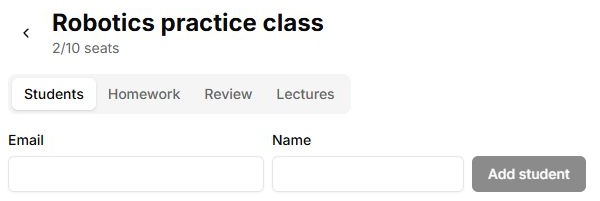
- On Students, enter an email and name.
- Select Add student. Check the new row and occupied-seat count.
- If no account existed, Lab creates one and sends an invitation. Ask the student to check their email and sign in using that address. A successful roster entry does not itself confirm email delivery.
Another teacher
In Teachers, enter your colleague’s email and select Add teacher. Verify the list. The owner is identified separately; joining the teaching team does not transfer ownership.
Archive and removal
The class list provides Archive and a reverse action for archived classes. Archiving affects access through that class. Save needed results before finishing a course. Delete is a separate confirmed action; do not use it in place of archiving. Remove in a student row removes membership of that class, not the entire account.
Controls
| Button or field | Action and result |
|---|---|
| New class | Opens creation. Enter a name and seat count; an empty name prevents saving. |
| Save / Cancel | Save creates the class and refreshes the list. Cancel closes without creating. Saving again is unavailable while the request runs. |
| Open | Opens the selected class. Check its heading before adding students and assignments. |
| Back arrow | Returns from the class to the complete class list. |
| Students / Homework / Review / Lectures | Switches content within the selected class. Switching tabs does not select another class. |
| Email; Name; Add student | Enter student details and add them to the class. Email is required. Check the student row, seat count and result message; email invitation delivery is a separate check. |
| Remove in a student row | Removes the student from this class. This changes class-based access rather than deleting the account. |
| Teachers → email → Add teacher | Adds a colleague to work with the class. Check the address before clicking and the new row afterwards. The owner label remains separate. |
| Archive / restore | Changes the class’s archived state and its use for access. Restore it from the archive to resume teaching. |
| Delete | Opens confirmation to delete the class. Check the name; Cancel keeps it. Use Archive to finish teaching without deletion. |